
Step 1: Remove Working Files
del ttt *WARNING: The script uses files beginning with "ttt" as working files and deletes them at the start, so make sure this won't cause any problems. Remember to copy any files you want to save after running the script.
Step 2: Cosmic Ray Removal
gcombine u2g40o05t.c0h[1],u2g40o06t.c0h[1] ttt1 reject=ccdcrrej
         combine=average hsigma=3 rdnoise=5 gain=14
gcombine u2g40o09t.c0h[1],u2g40o0at.c0h[1] ttt1b reject=ccdcrrej
         combine=average hsigma=3 rdnoise=5 gain=14
There are several programs available for removing cosmic rays (e.g., gcombine, crreject, and a new program developed by Rick White currently being implemented into STSDAS). As is standard, two separate Omega-Cen exposures have been taken to help identify the cosmic rays. wfpc2_script1 uses gcombine for this step. An examination of the resulting images (ttt1 and ttt1b) shows that this task is quite successful at removing cosmic rays for these short exposures which inherently have few cosmic rays, and so have very few cases where cosmic rays fall on the same pixels on the two separate images (using the display task described on page 7). This becomes a bigger problem for long exposures. The [1] after each image name means we will work only on group 1 data (i.e., the PC chip) in this script. Note that the calibration data are taken with gain=14, while most observations are taken at gain=7.
For some scientific programs, such as finding relatively bright stars on short exposures, using the IRAF task cosmicrays to remove hot pixels may be sufficient. In other cases you may want to retrieve the current hot pixel list from WWW, or recalibrate using updated dark images from the archives. Another technique for removing hot pixels is to dither the images (i.e., observe them with slight offsets; see articles in the January and February 1995 versions of the Space Telescope Analysis Newsletter available via WWW or several articles in the February 1995 ST-ECF Newsletter available via WWW. You might also wish to apply the distortion image available on WWW (f1k1552bu.r9*) at this point.
A word of warning is in order about using cosmicrays. If you set the criteria too low, you may find that you begin removing the centers of real stars. Carefully examine the images before and after using this task (e.g., by "blinking" the images), or use imarith Step 3: Hot Pixel Removal
cosmicrays ttt1 ttt2 answer=no threshold=5 fluxrat=3 npasses=5 window=5
           interactive=no
cosmicrays ttt1b ttt2b answer=no threshold=5 fluxrat=3 npasses=5
           window=5 interactive=no
Before we can identify the stars, we need to remove a few hot pixels that might be mistaken for stars. This is not critical for these very short exposures since the background is not high enough to allow any but the "hottest" pixels to be evident. The only hot pixels removed during this step are [135,189], [609,623], and [154,107]. However, hot pixels may be the primary difficulty when looking for very faint point sources on long exposures.
Some of the other parameters defined here are:
WARNING: These zero points are appropriate only for the particular choice of apertures and exposure times used in this script. See Holtzman et al. (The Photometric Performance and Calibration of WFPC2, Jon Holtzman et.al., 1995, in prep., and Photometry with the WFPC2, Brad Whitmore, 1995, Proceedings of the 1995 HST Calibration Workshop; both papers available at WWW), for further discussion on this subject.
The results are written to ttt3.mag.1 for the F555W results and to ttt3b.mag.1 for the F814W results, and will look something like this:
These can be a little hard to read. To clarify, some of the main parameters from the first object are:
XINIT= 288.201 (X position)
As seen above, there are 184.47 counts in the main aperture, a background of -0.01503 times 28.5715 = -0.43 needs to be subtracted off, so the corrected flux is 184.47 + 0.43 = 184.90, hence the final result is -2.5 log(184.90) + 24.575 = 18.908 mag.
The relevant information is then written to ttt4 and ttt4b, and the offset used in step 4 is added back in.
The results indicate that the zero points are accurate and the scatter in the measurements is 0.022 mag for F555W and 0.019 for the F814W measurements.
The final results for the stars in common with Harris et al. are in ttt7, as shown below. The full listing for all the detected stars is in ttt5 (sorted in order of Y) and ttt6 (sorted in order of F555W magnitude).
NOTE: To make a hardcopy rather than plotting on your computer screen just change "stdgraph" to "stdplot" below and remove # in front of "gflush". To make a PostScript file, change stdgraph to "psi_land" (landscape) or "psi_port" (portrait), and remove the # in front of "gflush".
NOTE: table1header.cd is the header file which should be downloaded along with the script and the data files.
Generated with CERN WebMaker
Step 4: Trim Off the Region Occulted by the Pyramid
imcopy ttt2[44:799,52:799] ttt3
imcopy ttt2b[44:799,52:799] ttt3b
Before identifying the hot pixels we need to trim off the regions occulted by the pyramid, as well as the last column or two, or we will get lots of false identifications. Note that if you modify this script to work on the other chips, you will need to change the region that is trimmed since the occulted region is different for each chip. See Table 2.5 of the WFPC2 Instrument Handbook for information on the regions occulted on each chip. Step 5: Identify the Object
daofind ttt3 output=ttt3.coo.1 sigma=0.5 nsigma=1.5 fwhmpsf=1.5 thresho=10
        readnoi=7.1 epadu=28 sharplo=.2 verify=no interactive=no
The daofind task from DAOPHOT (Stetson, 1987, PASP, 99, 111) is used to identify the stars. The current setup searches for objects that are more than 10 sigma above the local background and writes them to the file ttt3.coo.1. Sigma must be set manually. For example, the command "imstat u2g40o05t.c0h[1][200:300,220:320] lower=-2 upper=2" has been used in this case to determine the background in a very blank region.
nsigma = 1.5           (width of convolution kernel in sigma)
fwhmpsf = 1.5          (full-width-half-maximum of star)
thresho = 10           (threshold in units of sigma)
epadu = 28             (electrons per adu [counts]; used to estimate +/-)
                       (this is often called "gain" by other programs)
readnoise=7.1          (readnoise)
The coordinate list written to ttt3.coo.1 will look something like this:
#K IRAF       = NOAO/IRAFV2.10.3BETA    version    %-23s
#K USER       = whitmore                name       %-23s
#K DATE       = 03-17-95                mm-dd-yr   %-23s
#K TIME       = 15:00:56                hh:mm:ss   %-23s
#K PACKAGE    = apphot                  name       %-23s
#K TASK       = daofind                 name       %-23s
#
#K SCALE      = 1.                      units      %-23.7g
#K FWHMPSF    = 1.5                     scaleunit  %-23.7g
                        :
                        :
#N XCENTER   YCENTER   MAG      SHARPNESS   ROUNDNESS   ID                     \
#U pixels    pixels    #        #           #           #                      \
#F %-13.3f   %-10.3f   %-9.3f   %-12.3f     %-12.3f     %-6d                   \
#
   294.201   78.858    -2.345   0.911       -0.109      1
   697.219   104.314   -0.158   0.815       0.118       2
			                         :
			                         :
   561.083   668.179   -1.480   0.920       0.060       34
   654.141   739.081   -1.659   0.957       -0.066      35
See A User's Guide to Stellar CCD Photometry with IRAF by P. Massey and L. E. Davis (available from NOAO) for lots more details about DAOPHOT (e.g., running it interactively to tune the parameters for your own use). Step 6: Aperture Photometry
phot ttt3 skyfile="" output=ttt3.mag.1 coords=ttt3.coo.1 readnoi=7.1
     epadu=28 exposure="" aperture=3 salgori=median zmag=24.575
     annulus=10 dannulus=5 calgori=none interactive=no verify=no
phot ttt3b skyfile="" output=ttt3b.mag.1 coords=ttt3.coo.1 readnoi=7.1
     epadu=28 exposure="" aperture=3 salgori=median zmag=23.428
     annulus=10 dannulus=5 calgori=none  interactive=no verify=no
txdump ttt3.mag.1 xcenter,ycenter,mag,merr mode=h > ttt4
txdump ttt3b.mag.1 mag,merr mode=h > ttt4b
tcalc ttt4 c1 "c1+43"
tcalc ttt4 c2 "c2+51"
Aperture photometry is performed using an aperture with a radius of 3 pixels ("aperture=3"), the background determine by the median ("salgori=median"; the median is less sensitive to contaminating objects in crowded fields), within an annulus from 10 pixels ("annulus=10") to 15 pixels ("dannulus=5"). The coordinate list from the previous step is used with no recentering ("calgori = no"). The zero point is 24.575 for the F555W observations and 23.428 for the F814W observations. For example, an object with 100 counts in the F555W filter has a magnitude of -2.5 log (100) + 24.575 = 19.575 mag.
                        :
                        :
#K SALGORITHM = median                  algorithm  %-23s
#K ANNULUS    = 10.                     scaleunit  %-23.7g
#K DANNULUS   = 5.                      scaleunit  %-23.7g
                        :
                        :
#
#K WEIGHTING  = constant                model      %-23s
#K APERTURES  = 3                       scaleunit  %-23s
#K ZMAG       = 24.575                  zeropoint  %-23.7g
#
#

#N IMAGE               XINIT     YINIT     ID   COORDS                 LID     \
#U imagename           pixels    pixels    ##   filename               ##      \
#F %-23s               %-10.3f   %-10.3f   %-5d %-23s                  %-5d
#
#N XCENTER    YCENTER    XSHIFT  YSHIFT  XERR    YERR    CIER CERROR           \
#U pixels     pixels     pixels  pixels  pixels  pixels  ##   cerrors          \
#F %-14.3f    %-11.3f    %-8.3f  %-8.3f  %-8.3f  %-8.3f  %-5d %-13s
#
#N MSKY           STDEV          SSKEW          NSKY   NSREJ SIER SERROR       \
#U counts         counts         counts         npix   npix  ##   serrors      \
#F %-18.7g        %-15.7g        %-15.7g        %-7d   %-6d  %-5d %-13s
#
#N ITIME          XAIRMASS       IFILTER                OTIME                  \
#U timeunit       number         name                   timeunit               \
#F %-18.7g        %-15.7g        %-23s                  %-23s
#
#N RAPERT   SUM            AREA           MAG    MERR    PIER PERROR           \
#U scale    counts         pixels         mag    mag     ##   perrors          \
#F %-12.2f  %-15.7f        %-15.7f        %-7.3f %-6.3f  %-5d %-13s
#
ttt3                   294.201   78.858    1    ttt3.coo.1             1       \
   294.201    78.858     0.000   0.000   INDEF   INDEF          0    NoError   \
   -0.0150283     0.3968335      -0.2390791     389    3        0    NoError   \
   1.             INDEF          INDEF                  INDEF                  \
   3.00     184.4735      28.5715     184.9029     18.908 0.020 0    NoError
ttt3                   697.219   104.314   2    ttt3.coo.1             2       \
   697.219    104.314    0.000   0.000   INDEF   INDEF          0    NoError   \
   -0.0236741     0.3923617      -0.1982743     391    2        0    NoError   \
   1.             INDEF          INDEF                  INDEF                  \
   3.00     29.98758      28.52468    30.66288     20.858 0.085 0    NoError
                              :
                              :
ttt3                   654.141   739.081   35   ttt3.coo.1             35      \
   654.141    739.081    0.000   0.000   INDEF   INDEF          0    NoError   \
   -0.05124146    0.4315955      -0.1955512     302    2        0    NoError   \
   1.             INDEF          INDEF                  INDEF                  \
   3.00     92.23106      28.44914    93.68884     19.646 0.035 0    NoError
YINIT=70.858 (Y position)
ID = 1 (ID number)
MSKY = -0.0150283 (counts in the background annulus; NOTE: The background
has been slightly over-subtracted in this image.)
SUM = 184.4735 (total counts in the object aperture)
AREA = 28.5715 (area in pixels2 in the object aperture)
MAG = 18.908 (object magnitude)
MERR = 0.025 (magnitude uncertainty) Step 7: Merge the Tables into one Table and Calculate the Mean Value of (F555W - F814W)
tmerge ttt4,ttt4b ttt5 allcols=yes option=merge
tcalc ttt5 new c3-c5
tstat ttt5 c7
This step merges the tables obtained for the F555W and F814W filters into a single table (ttt5), determines the value of (F555W - F814W) which it puts into a new column (c7), and then determines the mean value of (F555W - F814W) along with a few other statistics. The statistics are written to the screen, but are not saved in a file. Step 8: Compare the Results with Harris et al.
copy ttt5 ttt6
tsort ttt6 c3
joinlines ttt6,omegacen_1 > ttt7a
tselect ttt7a ttt7 "c15 == 0"
tcalc ttt7 new c3-c11
tcalc ttt7 new c5-c13
tstat ttt7 c16
tstat ttt7 c17
Table 5 is copied and sorted by F555W magnitude, and then joined with the file omegacen_1 which contains the published ground based photometry from Harris, AJ, 105, 1196. The file omegacen_1 must be downloaded along with the script (see Appendix A). The differences between the WFPC2 and Harris et al. measurements are then computed and put into columns c13 and c14, and the statistics on the comparison are written to the screen but are not copied to a file.
#       X        Y       V    +/-       I    +/-      V-I    X    Y    ID    gr V    +/-    gr I    +/-  f   V - gr V   I - gr I
# -------  -------  ------  -----  ------  -----     ----  ---  ---  ----  ------  -----  ------  -----  -  ---------  ---------

# 143.036  453.827  14.792  0.002  13.678  0.002    1.114  143  454  1629  14.799  0.004  13.656  0.004  0     -0.007      0.022
# 315.165  191.122  16.339  0.005  15.346  0.005    0.993  315  191  1461  16.359  0.008  15.348  0.006  0      -0.02     -0.002
# 313.878  662.084  16.629  0.005  15.601  0.006    1.028  314  663  1714  16.598  0.006  15.598  0.007  0      0.031      0.003
# 716.766  196.045  17.748   0.01  16.882  0.012    0.866  717  196  1425  17.751  0.008  16.906  0.013  0     -0.003     -0.024
Step 9: Display the Image and Mark the Objects
display ttt2 1 zrange=no z1=-5 z2=100 ztrans=linear
tvmark 1 coords=ttt4 mark=circle radii=5 color=202 label=no number=yes
       nxoffse=10 nyoffset=0 pointsi=1 txsize=1 interac=no
tvmark 1 coords=ttt7 mark=rectangle lengths=15 color=203
       label=no number=yes nxoffse=10 nyoffset=-30 pointsi=3 txsize=3
       interac=no
The image is displayed and the stars are identified (see Figure 1 on page 1). The stars within the black circles are from the full object list, while the stars within the white squares are 2 of the 4 in common with the Harris et al. measurements. Step 10: Use IGI to Plot the Color-Magnitude Diagram
Make a plot of the color-magnitude diagram.
igi device=stdgraph
data ttt5
xcol 7
ycol 3
limits .5 1.5 22 14
box
xlabel (V-I)
ylabel V
ptype 12 3
points
bye
# gflush
Color magnitude diagram of the stars in a PC image of Omega-Cen as generated by igi.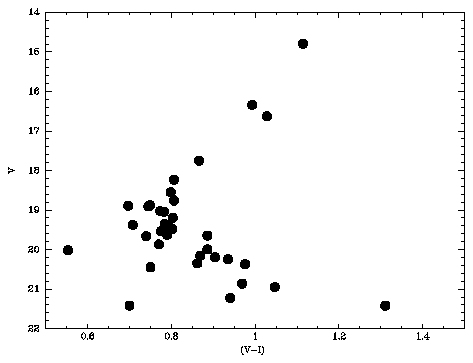
Step 11: Make a LaTeX File and Preview the Results
Make a LaTeX file of the results, convert it to PostScript, and preview it.
tcreate ttt5.tab table1header.cd ttt5 hist=no
tprint ttt5.tab pwidth=80 plength=40 showrow=yes columns=* option=latex
       > ttt5.tex
!latex ttt5
!dvips ttt5
!ghostview ttt5.ps &
Positions and magnitudes of the stars in a PC image of Omega-Cen as generated by tcreate. 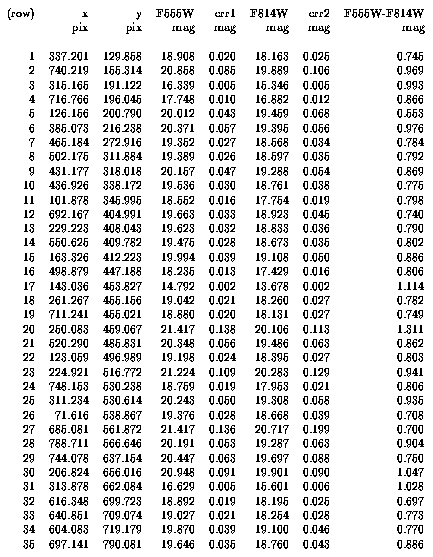
[Previous] [Next] [Up]