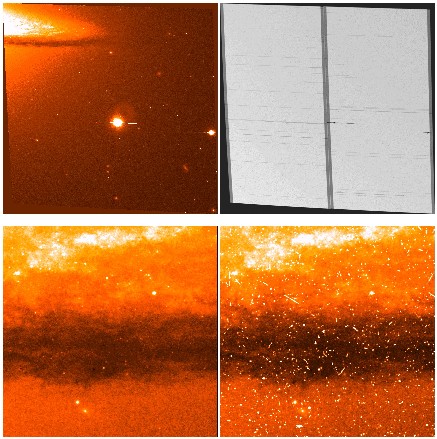
MultiDrizzle is a single, integrated script designed to provide automated registration, cosmic ray rejection and final image combination of dithered HST images. The purpose of this script is to allow easy interaction with the complex suite of tasks in the IRAF/STSDAS `dither' package, as well as the `PyDrizzle' task, while at the same time retaining the flexibility of these tasks through a number of parameters. These parameters control the various individual steps, such as sky subtraction, image registration, `drizzling' onto separate output images, creation of a clean median image and subsequent cosmic ray masks, as well as the final image combination step using `drizzle'. The default parameters of all the steps are set so that the task will work automatically for a wide variety of different types of images, while at the same time allowing adjustment of individual parameters for special cases.
The following paper presents the reference overview of the capabilities of
MultiDrizzle:
See also the STScI HST/ACS MultiDrizzle page:
The script carries out the following steps, all completely automatically. Individual steps can also be selected by turning each step on/off.
| 1. Static Mask | Identify negative bad pixels, based on examining all the images, and include them in the data-quality array |
| 2. Sky Subtraction | Sky-subtract each input image |
| 3. Driz_Separate | Drizzle the input images onto separate, registered outputs (using shifts computed from the headers) |
| 4. Median | Create a median image from the separate drizzled images |
| 5. Blot | "Blot" the median image back to each original input image frame |
| 6. Driz_cr | Use each blotted image to create a derivative image, and compute cosmic ray masks |
| 7. Driz_Combine | Do the final drizzle combination, using the newly created cosmic ray masks |
| staticfile | Name of (optional) input static bad-pixel mask | |
| static_goodval = 1.0 | Value of good pixels in the input static mask |
This step goes through each of the input images, calculates the r.m.s
value for each chip, and identifies pixels that are below the mode
value by more than 5 times the r.m.s. Sometimes such pixels will fall
on a bright object so they would not be negative, instead they would
appear positive but lower than surrounding pixels. However, they should
land on blank sky at least some of the time, in which case they will
appear negative and will be flagged.
| skyname = "SKYSUM" | Header keyword containing sky value | |
| skywidth = 20. | Interval width for sky statistics | |
| skystat = "mode" | Sky correction statistics parameter | |
| skylower = -99.0) | Lower limit of usable data for sky (always in DN) | |
| skyupper = 4096.0) | Upper limit of usable data for sky (always in DN) |
This step subtracts either the entire chip (skytype="single") or specific
regions corresponding to each individual amplifier (skytype="quadrants").
The other parameters correspond directly to those in the "sky" task,
and are passed to it exactly as they are specified here.
| driz_sep_outnx = | Output image size in x | |
| driz_sep_outny = | Output image size in y | |
| driz_sep_kernel = turbo | Shape of kernel function | |
| driz_sep_scale = 1.0 | Size of output pixels (relative to input) | |
| driz_sep_pixfrac = 1.0 | Linear size of drop in input pixels | |
| driz_sep_rot = 0. | Rotation to be applied (degrees anti-clockwise) | |
| driz_sep_fillval = INDEF | Value given to undefined pixels |
This step drizzles the input images onto separate output frames. By default
it uses the "turbo" drizzle kernel, and drizzle parameters of pixfrac=1 and
scale=1. These can be changed; for example masks can be substantially improved
by specifying a smaller value of scale (eg, 0.5 or 0.66), with the primary
trade-off being much larger images (their size increases as the inverse
square of the value of "scale"), which can lead to problems with memory or
disk space problems unless you're careful. The shifts used here are calculated
initially from the image headers by pydrizzle; if "tweakshift1" reports a
large enough residual shift, then this step is repeated with the additional
shifts included.
| median_newmasks = yes Create new masks when doing the median? | |
| combine_type = median Type of combine operation | |
| combine_reject = minmax Type of rejection | |
| combine_nsigma = 3.0 Significance for accepting minimum instead of median | |
| combine_nlow = 0 minmax: Number of low pixels to reject | |
| combine_nhigh = 1 minmax: Number of high pixels to reject | |
| combine_grow = 1.0 Radius (pixels) for neighbor rejection |
This creates a median image from the separate drizzled input images, allowing a variety of combination and rejection schemes. If "combine_type" is set to "median" or "average", then the routine will call the IRAF task "imconbine", passing to it the values of "combine_reject" (usually expected to be set to "minmax"), along with "combine_nlow" and "combine_nhigh" (the number of low and high pixels to reject) and "combine_grow", the amount by which flagged pixels can grow. If "median_newmasks" is set to yes, then pixels are flagged using the static bad pixel masks, along with the single-image CR masks if the option to include them was specified earlier. If this parameter is set to "no" then the task does nto generate bad pixel masks, which allows you to specify your own, although in general the ones that are used by default are the best ones to use.
If combine_type is set to "minmed", then this task will use a slightly more sophisticated algorithm than the ones in imcombine, to create a cleaner combined image. The basic concept is that the combined image will be either the median or the minimum pixel value, depending on whether the median is above the minimum by more than n*sigma. An estimate of the "true" counts is obtained from the median image (after rejecting the higest-valued pixel), while the minimum is actually the minimum unmasked ("good") pixel. This algorithm is designed to do well in the case of triple-incidence cosmic rays, which typically cause problems for simple median combination strategies. The algorith does the following steps:
| [none] |
This takes the median image and "blots" it back to the reference frame
of each of the original individual input images, in preparation for the
subsequent steps of cosmic-ray rejection using deriv and driz_cr.
| driz_cr_snr = '2.5 2.0' | |
| driz_cr_scale = '1.2 0.7' |
This step uses the original input images, the blotted images, and
the derivative of the blotted images (created using the "deriv" task)
to create a cosmic ray mask for each input image (using the "driz_cr"
task). The output cosmic ray mask is stored in a separate file, which
can then later be combined with other mask files. The "driz_cr" task
also creates a "_cor" image, in which the cosmic ray mask has been used
to identify bad pixels in the input images, which are then replaced with
corresponding pixels from the blotted median image. These "_cor" images
are useful when running tweakshift (in the next step), since they are
relatively free of cosmic rays and can therefore be used to determine
shifts using catalog-based algorithms.
| final_outnx = Output image size in x | |
| final_outny = Output image size in y | |
| final_kernel = 'square' Shape of kernel function | |
| final_scale = 1.0 Size of output pixels (relative to input) | |
| final_pixfrac = 1.0 Linear size of drop in input pixels | |
| final_rot =0. Rotation to be applied (degrees anti-clockwise) | |
| final_fillval = INDEF Value given to undefined pixels |
This takes the original input images, together with the final cosmic ray masks, and drizzles them all onto a single output image. The standard drizzle parameters of kernel, scale, pixfrac and rot can be specified for this task. By default the pixel scale of the output image is 1, but feel free to experiment with other options (eg scale=0.5, pixfrac=0.7 will yield a somewhat sharper output image at the expense of much CPU time and disk space).