
HST Data Handbook for WFPC2
 |
 |
 |
 |
 |
|
| HST Data Handbook for WFPC2 | ||||
|
3.2 Data Processing Steps
After WFPC2 observations have executed, the data pass through the OPUS pipeline, where they are processed and calibrated. A substantial fraction of header keyword values are extracted and used to populate the Archive databases; observers access these databases each time they browse the Archive contents and perform searches via the
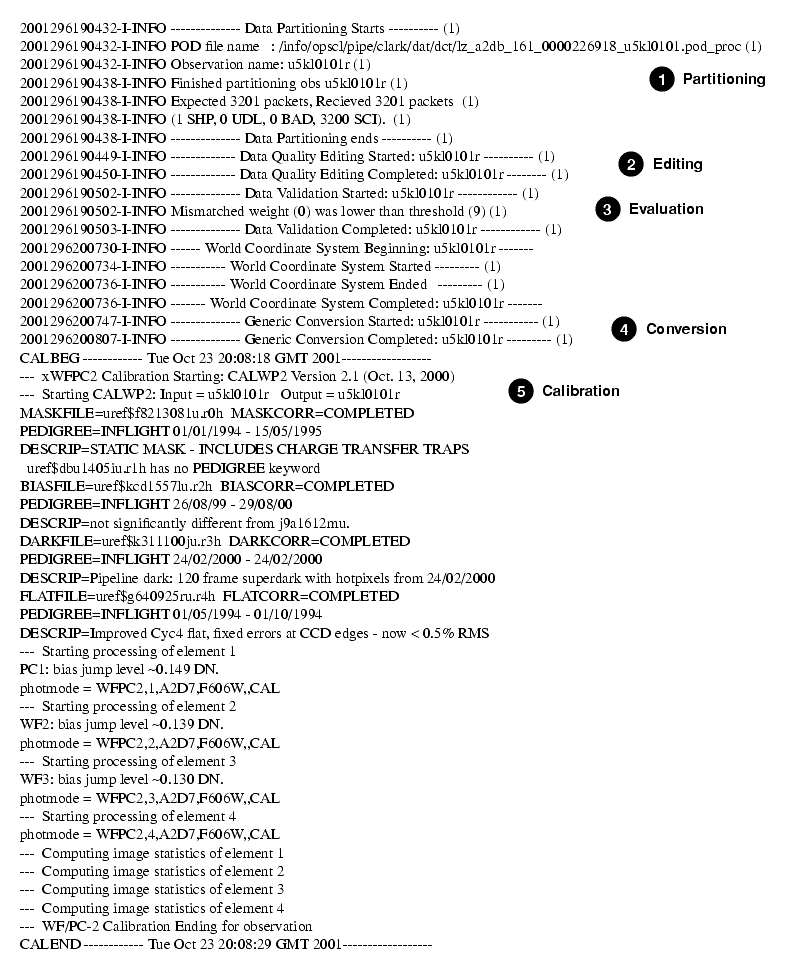
HST Archive Search WWW formor the Archive'sdatabase browser, StarView. The resulting raw and calibrated data files from this first pipeline processing are not seen by the observer. Instead, when an archive data request is submitted, the images are completely reprocessed by the On-The-Fly Reprocessing (OTFR) system before they are delivered. The OTFR system processing is identical to the OPUS pipeline processing, except that, as discussed in the previous section, the most up-to-date reference files and software at the time of processing are used. So, for example, if an observer waits several weeks after an observation before requesting the data products, it is very likely that OTFR will have access to an updated dark reference file with which to process the science data - a reference file that was not in place at the time the observation was taken (seeReference File Memo).All of the steps performed by OTFR are the same as those performed in the OPUS pipeline; these steps are recorded in the trailer file for each dataset. Figure 3.1 shows an example of a trailer file and identifies the major pipeline steps:
Figure 3.1: Sample Trailer File
- The data are partitioned: the POD file is separated into individual files, e.g., the engineering and science data sections.
- The data are edited to insert dummy values (an arbitrary assigned value given in the header keyword STDCFFP) in place of missing pixel values.
- The data are evaluated to determine discrepancies between the subset of the planned and executed observational parameters.
- The data are converted to a generic format and the header keywords populated.
- The data are calibrated using a standard WFPC2-specific calibration algorithm and the best available reference files.
3.2.1 Calibration of WFPC2 Images
The calibration software used by both the OPUS pipeline and OTFR is the same as that provided within STSDAS (calwp2 in the hst_calib package). The calibration files and tables used are taken from the Calibration Data Base (CDBS) at STScI and are the most up-to-date calibration files available at the time of processing. All CDBS files are available through the HST Data Archive. (See chapter 1 of the HST Introduction).
The flow of the data through calwp2 is presented in schematic form in figure 3.2. The software takes as input the raw WFPC2 data file pairs (see table 2.1) and any necessary calibration reference images or tables. The calibration steps performed are determined by the values of the calibration switches (e.g., MASKCORR, BIASCORR, etc.) in the header of the raw data (.
d0h) file. Likewise, the reference files to be used in the calibration of the data are set by the values in the reference file keywords (e.g., MASKFILE, BIASFILE, BIASDFILE, etc.). The appropriate settings of the calibration switches and reference file keywords depend on the instrumental configuration used (such as A-to-D gain,MODE,SERIALS, filters), the date of the observation, and any special pre-specified constraints. They are initially set in the headers of the raw data file during the generic conversion step, see figure 3.1; if reprocessing is necessary, they can be redefined by editing the raw header file (.d0h) using the STSDAS tasks hedit or chcalpar and then running calwp2 on the raw files.The values of the calibration switches in the headers of the raw and calibrated data indicate which processing steps the pipeline applied to the data and the reference files used. Calibration switches will have one of the following values:
PERFORM - calibration step to be applied by calwp2
OMIT - correction is not performed during processing
COMPLETE - calibration step has been completed
SKIPPED - step was skipped because the reference file was a dummy or placeholder file (i.e., has no effect on the data, such as a flatfield filled with values of 1).
For convenience, these keywords are reported in several locations:
- In the dataset information page of the paper products, see section 2.4.
- In the trailer files, see figure 3.1.
- In the HISTORY keywords at the end of the calibrated science data image (
.c0h) file.As with other header keywords, the calibration keywords can be viewed using the STSDAS tasks imhead, hselect, or hedit. Alternatively, the chcalpar task in the STSDAS tools package can be used to view and change the calibration keywords directly.
The flow chart below summarizes the sequence of calibration steps performed by calwp2, including the input calibration reference files and tables, and the output data files from each step. The purpose of each calibration step is briefly described in the accompanying table; a more detailed explanation is provided in the following section.
Figure 3.2: Pipeline Processing by calwp2
Table 3.2: Calibration Steps and Reference Files Used for WFPC2 Pipeline Processing
|
Space Telescope Science Institute http://www.stsci.edu Voice: (410) 338-1082 help@stsci.edu |
| |
|
|
|
|